Doing Most by using Less – “Super-tuning” Sony Ericsson P1i, available around 80 dollars.
Hello, here it is me again, HX. 
Today I want to share my voyage in the land of abounded UIQ3 and its best ever gadget in hand-held form factor manufactured, announced and released by Sony Ericsson. As I am very practical guy I have not found any real propose of those tons of Megahertz and RAM in todays SmartPhones. Android, huh? I bet only advantage yet is its Linux kernel. I will now put this article to show that there is only few things you are limited with this – P1i – Smartphone, even in Year 2011 ! So, here we go
Presenting – Sony Ericsson P1i : http://www.sonyericsson.com/cws/support/phones/p1i?cc=gb&lc=en.
Phone that Puts together:
1. easy-to-use QWERTY from SE M600i ( a.k.a Messenger );
2. feature-full WLAN from SE P9xxi ;
3. life-style Entertainment from SE W960i ( a.k.a Walkman Extreme ).
1. RAM Amount, which is 128 MB. I am not more-is-better fanboy and still doubt that 512MB on Smatphone is very useful If you want to play Counter-Strike on phone, that is pretty weird … but you can do it anyway … it is just total nonsense.
2. WLAN functionality. What is Smartphone without capability to use Web and Connectivity for SMART purposes, like, VoIP with Fring ! Calling for free to your friends is kickass. So you are smart person – you use communication functionality for free.
3. Built-in / Pre-installed / Office platform. I have not tested all available Smartphone Office solutions, but still it is Must-Have for Smartphone Class Devices to have ( free ) built-in Office solution.
—
Now we move to the most interesting part – the voyage with making SE P1i to the max. Continued…
Today I want to share my voyage in the land of abounded UIQ3 and its best ever gadget in hand-held form factor manufactured, announced and released by Sony Ericsson. As I am very practical guy I have not found any real propose of those tons of Megahertz and RAM in todays SmartPhones. Android, huh? I bet only advantage yet is its Linux kernel. I will now put this article to show that there is only few things you are limited with this – P1i – Smartphone, even in Year 2011
! So, here we go Presenting – Sony Ericsson P1i : http://www.sonyericsson.com/cws/support/phones/p1i?cc=gb&lc=en.
Phone that Puts together:
1. easy-to-use QWERTY from SE M600i ( a.k.a Messenger );
2. feature-full WLAN from SE P9xxi ;
3. life-style Entertainment from SE W960i ( a.k.a Walkman Extreme ).
Before I get my hands on this one, I used to have modded my SE K550i to the max ( incl. crossflash to W610i ) … then I moved to SE W950i and this is keypoint.If you used to have SE W950i you will understand that it lacks some features that has P1i, which is:
1. RAM Amount, which is 128 MB. I am not more-is-better fanboy and still doubt that 512MB on Smatphone is very useful
If you want to play Counter-Strike on phone, that is pretty weird … but you can do it anyway … it is just total nonsense.2. WLAN functionality. What is Smartphone without capability to use Web and Connectivity for SMART purposes, like, VoIP with Fring ! Calling for free to your friends is kickass. So you are smart person – you use communication functionality for free.
3. Built-in / Pre-installed / Office platform. I have not tested all available Smartphone Office solutions, but still it is Must-Have for Smartphone Class Devices to have ( free ) built-in Office solution.
—
Now we move to the most interesting part – the voyage with making SE P1i to the max. Continued…
1 comment
– November 25, 2010
SEDev Patch Studio
I am pleased to introduce you to brand new application, silently developed for about year and now finally available to public. Let me present you: SEDEV Patch Studio 1.2, Release Candidate 3, build 1.0.4.10-all10 ( also tagged ” Nightly Build” ).
As title says, application should close to IDE class applications. Would be great to have RAD capabilities, too, huh?
At first approach to Projects Homepage @ Google Code source, you will read list with application usage examples. Looks promising. Will it be the same in action?
In this review I will not post any screenshots due fact that this then would be very lengthy review, so only essential screenshots will be placed!
Application offers very extensible additional content. At startup, if there will be no Splash Screens in folder “%AppPath%/Splash/”, you will not see them, otherwise – if there is at least one Splash Screen ( in this case – “BlackSplash” in folder, you will have this look on your screen:
SEDEV PS BlackSplash Screen by ~HXunbanned on deviantART
Continued…
As title says, application should close to IDE class applications. Would be great to have RAD capabilities, too, huh?
At first approach to Projects Homepage @ Google Code source, you will read list with application usage examples. Looks promising. Will it be the same in action?
Project mainly is intended to deliver on-the-fly VKP Recovery Patch generation in the case when:So the thing what this application should do is enough clear to continue. Shall we, ladies and gentleman?
- Sony Ericsson mobile phone does not function properly after VKP Patch has been applied;
- Sony Ericsson phone needs to be restored to original firmware state in case of Official / Warranty Repairs in Service Center;
- Sony Ericsson phone flash files needs to be verified prior flashing them using any Flashing program…
- Sony Ericsson phone patch files data and / or comment part extraction and modifications
- And more…
In this review I will not post any screenshots due fact that this then would be very lengthy review, so only essential screenshots will be placed!
Application offers very extensible additional content. At startup, if there will be no Splash Screens in folder “%AppPath%/Splash/”, you will not see them, otherwise – if there is at least one Splash Screen ( in this case – “BlackSplash” in folder, you will have this look on your screen:
SEDEV PS BlackSplash Screen by ~HXunbanned on deviantART
Continued…
– August 9, 2010
Red light blinking? Dead phone? Any/All CID erom repair/downgrade using OMNIUS
SORRY PEOPLE BUT OMNIUS IS NO MORE FREE NOW, SO NO EROM REPAIR FOR FREE RIGHT NOW!
You try to start your phone but the red light at the infrared port blinks 5 times and phone refuses to start.Far manager, XS++ and SeTool 2 lite no longer detect your phone. Your computer also does not identify your phone. And its seems to be completely Dead..Read On, We will fix it.
Phones supported : All those phones which Omnius supports. Almost all from SE. Check yours in there.
UPDATE: This method includes fixing erom version CID53 also. Which was not possible for free till date. Also if everything is fine but you want to downgrade to lower version of erom then you can follow the given steps.
Redlight blinking is a Sign of Low Battery or a Dead EROM. Some time during flashing the EROM goes dead or corrupt due to errors. If phone has a bad EROM it shuts down and does not start even if battery is charged to full. It may happen very rare times just like that too!
Double Check that battery is not the problem before you proceed to flash the EROM.
In that case we have to repair the EROM. And now here we will discuss the easiest way to fix it.
Continued…
You try to start your phone but the red light at the infrared port blinks 5 times and phone refuses to start.Far manager, XS++ and SeTool 2 lite no longer detect your phone. Your computer also does not identify your phone. And its seems to be completely Dead..Read On, We will fix it.
Phones supported : All those phones which Omnius supports. Almost all from SE. Check yours in there.
UPDATE: This method includes fixing erom version CID53 also. Which was not possible for free till date. Also if everything is fine but you want to downgrade to lower version of erom then you can follow the given steps.
Redlight blinking is a Sign of Low Battery or a Dead EROM. Some time during flashing the EROM goes dead or corrupt due to errors. If phone has a bad EROM it shuts down and does not start even if battery is charged to full. It may happen very rare times just like that too!
Double Check that battery is not the problem before you proceed to flash the EROM.
In that case we have to repair the EROM. And now here we will discuss the easiest way to fix it.
Continued…
Posted in Tutorials.
– July 22, 2010
A2 Permanent Patching Using OMNIUS, A2uploader and FAR manager CXC Patcher
SORRY PEOPLE BUT OMNIUS IS NO MORE FREE NOW, SO NO EROM CONVERSION FOR FREE RIGHT NOW!
Phones supported
C510, C702, C901, C902, C903, C905, G502, G705, K630, K660, K850, V640, T700, T707, T715, TM506, W508, W595, W705, W715, W760, W890, W902, W910, W980 , W995, Z750, Z770, Z780 etc.
Finally after a long spam of time permanent patching for A2 phones is out! Earlier it was jjpatcher which helped A2 users in patching but only for run-time which meant after a restart of phone all the values are restored back to normal which caused patches to be removed. Also it was unstable as the values which were in use were not used to get totally patched resulting in unstable functioning. But now you can have a patched A2 phone.
Update: Since few days Aerix support was not there so now OMNIUS is the latest software which will be used. The new method with all detailed steps are updated below.
Required Downloads:
Also you will need a registered account at OMNIUS (compulsory). All operations and registration at OMNIUS is free for now. If you don’t have account yet CLICK HERE.
Continued…
Phones supported
C510, C702, C901, C902, C903, C905, G502, G705, K630, K660, K850, V640, T700, T707, T715, TM506, W508, W595, W705, W715, W760, W890, W902, W910, W980 , W995, Z750, Z770, Z780 etc.
Finally after a long spam of time permanent patching for A2 phones is out! Earlier it was jjpatcher which helped A2 users in patching but only for run-time which meant after a restart of phone all the values are restored back to normal which caused patches to be removed. Also it was unstable as the values which were in use were not used to get totally patched resulting in unstable functioning. But now you can have a patched A2 phone.
Update: Since few days Aerix support was not there so now OMNIUS is the latest software which will be used. The new method with all detailed steps are updated below.
Required Downloads:
Also you will need a registered account at OMNIUS (compulsory). All operations and registration at OMNIUS is free for now. If you don’t have account yet CLICK HERE.
Continued…
– October 2, 2009
Free Sony Ericsson A2 Unlocking !
This project has ended. The new tutorial to unlock A2 phones will be written in a few days. Use this tool till then http://www.omnius-server.com/
.
Aerix team has now come up a free A2 unlocking client. It supports all the latest Sony Ericsson A2 and A2 v.2 phones !
Phones Supported !
Here is a screen shot of Aerix tool.
 It has been tested with w910, g502, k850 by many guys in our modding community. It works well ! Clears the SIM Lock successfully.
A note though, this is full unlock and not patch unlock, you will lose your phone warranty if you perform a full unlock. Temporary patch unlocking is not yet out for free ! Patch unlocks can be removed by reflashing the main firmware.
Regards,
Akshay.
.
Aerix team has now come up a free A2 unlocking client. It supports all the latest Sony Ericsson A2 and A2 v.2 phones !
Phones Supported !
C510, C702, C901, C902, C903, C905, G905,You can download it from Rapidshare, their official link or from filebase. You have to register at Aerix website to get access to free unlocking, you will need your username and password to login to the client. Using this tool is pretty easy. You should first Install USB Flash Drivers. Then Start Aerix Client and Click Unlock, Then shutdown phone, connect phone holding 2+5 and wait. It should unlock within 2 minutes !
G705, K630, K660, K850, K858, T700, TM506,
V640, W595, W705, W715, W760, W890, W902,
W908, W910, W980, Z750, Z770, Z780
Here is a screen shot of Aerix tool.
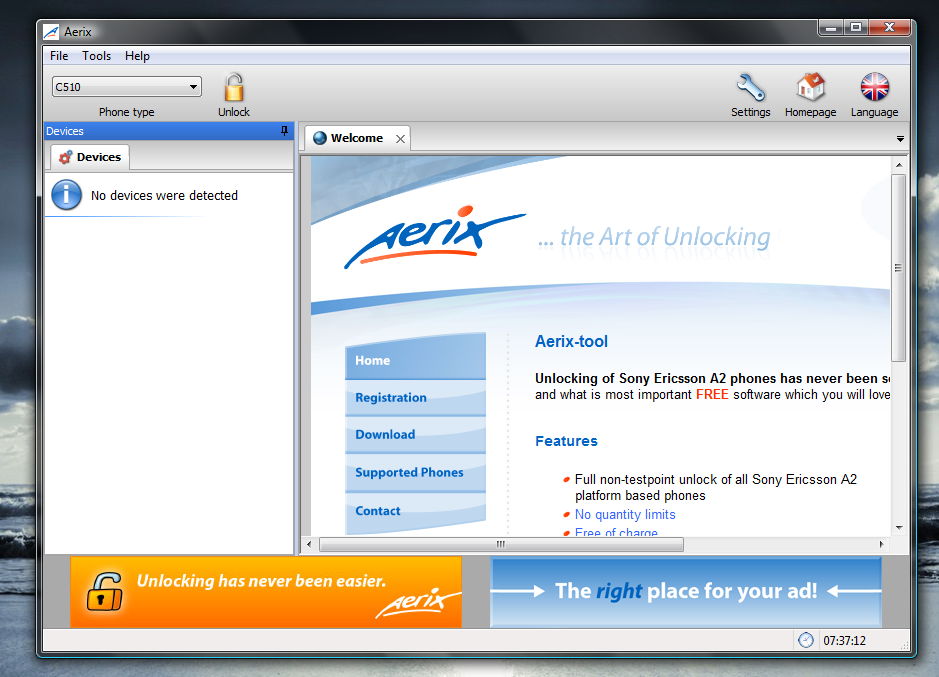 It has been tested with w910, g502, k850 by many guys in our modding community. It works well ! Clears the SIM Lock successfully.
A note though, this is full unlock and not patch unlock, you will lose your phone warranty if you perform a full unlock. Temporary patch unlocking is not yet out for free ! Patch unlocks can be removed by reflashing the main firmware.
Regards,
Akshay.
Posted in Tutorials.
– April 22, 2009
A2 Patching, JJPatcher(A2 Run Time Patcher) Tutorial/Guide
Note: There is an updated method for patching permanently. Still you can remove patches by reflashign firmware, just in case. A2 Permanent Patching .
A2 Phones also can be patched now, Thanks to JJPatcher by den_po.
Here is a list of current A2 platform Sony Ericsson phones; K630, K660, Z750, Z770, Z780, w595, W890, W910, W980, C702, C902, C905 etc.
You can verify your phone platform from the Phone Database.
Required Downloads:
A2Uploader(latest).
JJPatcher.
USB Flash Drivers.
Install USB Drivers via ggsetup.
Copy Patcher.jar and Patcher.jad to phone.
Install Patcher.Jar
Move the application from memory card to phone memory.
Continued…
A2 Phones also can be patched now, Thanks to JJPatcher by den_po.
Here is a list of current A2 platform Sony Ericsson phones; K630, K660, Z750, Z770, Z780, w595, W890, W910, W980, C702, C902, C905 etc.
You can verify your phone platform from the Phone Database.
Required Downloads:
A2Uploader(latest).
JJPatcher.
USB Flash Drivers.
Install USB Drivers via ggsetup.
Copy Patcher.jar and Patcher.jad to phone.
Install Patcher.Jar
Move the application from memory card to phone memory.
Continued…
Posted in Patching.
– January 14, 2009
Any/ALL CID Patching Tutorial/Guide DB2020
This tutorial is for Patching db2020 Sony Ericsson phones and all CIDs. So you can now patch your CID53 phone with this guide. You can also use this method to patch CID49, CID51 and CID52 also. Thus you can unlock your phone with unlock patch if you want to do so.
This tutorial is written for new and intermediate users. Advanced users may find this tutorial a bit lengthy, because of the details.
You can find out your phone platform, if its db2020 or not from the SE-LifeStyle Phone Database. Select db2020 in the left column and it will show all db2020. Or else select All in Platform and Click on phone in the Right column, it will show information about your phone platform and also possible CIDs. Its a pretty easy to use tool.
Downloads
Install USB Flash Drivers( You must install usb flash drivers, if not already installed.)
JD Flasher (Updated for AnyCID). (The main tool)
All CIDs Patching Files. AnyCID.ZIP
Video Tutorial, Download.
Read the tutorial, and don’t forget to watch the video to learn ! If you have any problems discuss them at our support forum !
Continued…
This tutorial is written for new and intermediate users. Advanced users may find this tutorial a bit lengthy, because of the details.
You can find out your phone platform, if its db2020 or not from the SE-LifeStyle Phone Database. Select db2020 in the left column and it will show all db2020. Or else select All in Platform and Click on phone in the Right column, it will show information about your phone platform and also possible CIDs. Its a pretty easy to use tool.
Downloads
Install USB Flash Drivers( You must install usb flash drivers, if not already installed.)
JD Flasher (Updated for AnyCID). (The main tool)
All CIDs Patching Files. AnyCID.ZIP
Video Tutorial, Download.
Read the tutorial, and don’t forget to watch the video to learn ! If you have any problems discuss them at our support forum
!Continued…
Posted in Tutorials.
– January 9, 2009
A2/Db3150 Backup with A2uploder script.
This tutorial/guide is about a method to backup the contents of your A2 phone file system, using a script and A2 Uploader. All files are backed to the disk in a single session.
Download Script. Right Click and Then select SaveTargetAs/SaveLinkAs to Download this text file.
Start A2Uploader.
Then press “…” for MISC files.
Insert the Script file and press “Write Script”.
Now connect your phone by holding “C” Button or “2+5″ Button.
A2Uploader will now begin the read process. It will copy all the files to A2Uploader\ph out\ directory. This will take time, so wait for it to complete.
The FS is mapped on your computer and constructed just as in the phone. This completes the backup of the File System. You can restore files if you screw them while modding your phone.
Thanks to NAZCA at SE-LifeStyle for the Script.
To understand it more you can download the video tutorial.
Regard,
Akshay
Bhuvan.
Download Script. Right Click and Then select SaveTargetAs/SaveLinkAs to Download this text file.
Start A2Uploader.
Then press “…” for MISC files.
Insert the Script file and press “Write Script”.
Now connect your phone by holding “C” Button or “2+5″ Button.
A2Uploader will now begin the read process. It will copy all the files to A2Uploader\ph out\ directory. This will take time, so wait for it to complete.
The FS is mapped on your computer and constructed just as in the phone. This completes the backup of the File System. You can restore files if you screw them while modding your phone.
Thanks to NAZCA at SE-LifeStyle for the Script.
To understand it more you can download the video tutorial.
Regard,
Akshay
Bhuvan.
Posted in Tips And Tricks.
– January 9, 2009
Warning/Sticky Message(SMS) Tutorial
This is just a fun trick, a warm up before we start the 2009 modding session with CID53 and A2/db3150 patching and much more  !
!
The End Result will be a message entry in your Inbox and Sent Messages. The special thing about this message is that, it will be forever on the top in the Inbox and Sent Messages. If you receive any new messages, they will always be pushed below the first message. So the idea is to stick a warning message on top of your Inbox and Sent Messages section. This will resemble just like those Stickies messages in forums/boards !!
Continued…
!The End Result will be a message entry in your Inbox and Sent Messages. The special thing about this message is that, it will be forever on the top in the Inbox and Sent Messages. If you receive any new messages, they will always be pushed below the first message. So the idea is to stick a warning message on top of your Inbox and Sent Messages section. This will resemble just like those Stickies messages in forums/boards !!
Continued…
Posted in Tips And Tricks.
– January 8, 2009
Restore Sony Ericsson WAP, MMS, 3G Settings.
We have come to know that many people are having problems configuring their phones after de-branding or after flashing it. Also there is a general mis-conception that after flashing you won’t be able to access 3G, WAP, Internet through your phone. That’s Wrong. Usually after de-branding your phone you lose all the WAP, Internet, MMS settings from the phone. And you won’t be able to send MMS or browse Internet.For MMS and WAP to function properly, you should first create Data Accounts in Phone Settings and Then create Internet Profile and MMS profiles which make use of the Data Account. For manually creating these accounts and profiles you will need a lot of technical information from your CellPhone Service Provider. You will need to know the APN, Proxy Address if any, Username and password settings. Hence the idea of manually setting up is not recommended, unless you have spare time to figure out things.
Continued…
De Brand your A2/db3150 Sony Ericsson phone
Alright finally A2 (db5150) debranding after all the adventures with db2020/db2010 ! Now this is the tutorial to de-brand your A2 phone and get rid of the branding ! And get a neat and clean phone without any restrictions. By de-branding all the restrictions imposed by your operator will be removed. Well but kindly note de-branding is not unlocking. Your phone will still be locked. To unlock your phone, check out the Aerix Tool.
A2 phones are C510, C702, C901, C902, C903, C905, G905, G705, K630, K660, K850, K858, T700, TM506, V640, W595, W705, W715, W760, W890, W902, W908, W910, W980, Z750, Z770, Z780 ! So make your sure phone is in this list. We will update this list as and when new phones are released.
Necessary stuff. Download all of them.
A2 phones are C510, C702, C901, C902, C903, C905, G905, G705, K630, K660, K850, K858, T700, TM506, V640, W595, W705, W715, W760, W890, W902, W908, W910, W980, Z750, Z770, Z780 ! So make your sure phone is in this list. We will update this list as and when new phones are released.
Necessary stuff. Download all of them.
- A2 Uploader.
- Download Latest A2 CDA Generator by Zahid a.k.a thaproxinator. 4Shared | RapidShare | MegaUpload | sendspace | MediaFire.
- Or CodeClaw Ultimate CDA Generator
- SEUS : Sony Ericsson Update Service.
Posted in Tutorials.
– December 12, 2008
A2Uploader Tutorial/Guide
A2 Uploader Tutorial/Guide.
Finally you can mod your A2/DB3150/DB3210 Phones. Thanks to the_laser.
A2 Phones, This is an updated list of A2 phones.
A2 v1/DB3150
C702, C902, G502 , K630, K660, K850, T700, V640, W595, W760, W890, W902, W910, W980, Z750, Z770, Z780.
A2 v2/DB3210
C510 ,C901, C903, C905, G705 W705, W715.
With A2uploader you can now flash the phone with firmwares, customize your phone, de-brand your phone, add files to phone FS-FileSystem, upload flash menus and change menu icons and perform all customizations possible on the file system. With A2uploader you can’t patch your phone yet, you can use jjpatcher to patch your phone though.
Downloads
Note: Some Anti Virus report a2uploader as a virus, its not true. A2uploader is clean software. If your Anti Virus software is having issues with a2uploader, then its highly recommended to disable your anti virus software while using a2uploader. Your anti virus should not stall a2uploader during flashing, other wise it may damage your phone.
USB Flash Drivers.
Before you can use a2uploader, you will need to install USB Flash drivers. A2uploader comes with an automatic flash driver installer. Just unpack the downloaded archive and you will find a file with name ggsetup, Install the Gordon Gate drivers with ggsetup. And you will be ready for the next setp. You should install USB drivers only for the first time.
Continued…
Finally you can mod your A2/DB3150/DB3210 Phones. Thanks to the_laser.
A2 Phones, This is an updated list of A2 phones.
A2 v1/DB3150
C702, C902, G502 , K630, K660, K850, T700, V640, W595, W760, W890, W902, W910, W980, Z750, Z770, Z780.
A2 v2/DB3210
C510 ,C901, C903, C905, G705 W705, W715.
With A2uploader you can now flash the phone with firmwares, customize your phone, de-brand your phone, add files to phone FS-FileSystem, upload flash menus and change menu icons and perform all customizations possible on the file system. With A2uploader you can’t patch your phone yet, you can use jjpatcher to patch your phone though.
Downloads
A2 uploader. Download Old Version ! New Version (for CID53) Download !The Old Version supports CID52 Reading from FS but no support for CID53, The New version Supports CID53 flashing/customization/filesystem, but no FS read, only FS write.
A2 Uploader Flash Video Tutorial. Download
Note: Some Anti Virus report a2uploader as a virus, its not true. A2uploader is clean software. If your Anti Virus software is having issues with a2uploader, then its highly recommended to disable your anti virus software while using a2uploader. Your anti virus should not stall a2uploader during flashing, other wise it may damage your phone.
USB Flash Drivers.
Before you can use a2uploader, you will need to install USB Flash drivers. A2uploader comes with an automatic flash driver installer. Just unpack the downloaded archive and you will find a file with name ggsetup, Install the Gordon Gate drivers with ggsetup. And you will be ready for the next setp. You should install USB drivers only for the first time.
Continued…
Posted in Applications, Tutorials.
– November 11, 2008
Our Life, in a new style, the SE-Lifestyle forums
We spent are last few weeks working hard on a new goal. “The new hope”, what we call our lifestyle…
An amazing new forum, to bring the best of Sony Ericsson World.
So now, get moving! Go to SE-Lifestyle.com, and register, start downloading our content, read tutorials, ask for help (in flashing or anything), or provide your own data, help us that way, play in our Arcade (games collection).
The other thing I must talk about is a brand new blog, located the same place, SE-Lifestyle Blog! We will have the latest news about Sony Ericsson there, keep informed!
An amazing new forum, to bring the best of Sony Ericsson World.
So now, get moving! Go to SE-Lifestyle.com, and register, start downloading our content, read tutorials, ask for help (in flashing or anything), or provide your own data, help us that way, play in our Arcade (games collection).
The other thing I must talk about is a brand new blog, located the same place, SE-Lifestyle Blog! We will have the latest news about Sony Ericsson there, keep informed!
Posted in Uncategorized.
– August 3, 2008
Using JDFlasher with DB2010 phones
Tutorial/guide for Db2010. DB2010 phones are K750, D750, W800, W300, Z530, etc. Use DBCIDExplorer to know what your phone is.
We always focused on DB2020 platform as our phones (mine and Akshay’s are K550@W610 models). We talked about the Quick-Access thing, without mentioning the history of patching.
Now it is clear that using JDFlasher is better than using SeTool2Lite, because it is faster and you can apply several patches with it without disconnecting the phone. Continued…
We always focused on DB2020 platform as our phones (mine and Akshay’s are K550@W610 models). We talked about the Quick-Access thing, without mentioning the history of patching.
Now it is clear that using JDFlasher is better than using SeTool2Lite, because it is faster and you can apply several patches with it without disconnecting the phone. Continued…
Posted in Tutorials, Uncategorized.
– July 18, 2008
Verifying Integrity of Firmwares. Especially CID53
Many CID53 Firmwares don’t work properly and have bad headers. You can’t flash such a firmware into your phone.
There may be many problems in a firmware. And recently many CID53 when used with jdflasher output the following error or something similar.
You can check it using the program babeck. Its basically babe-check. babe is SE standard firmware header.
Download babeck. Babeck can be used to check any sony ericsson firmware.
Instructions on how to use babeck.exe.
Continued…
There may be many problems in a firmware. And recently many CID53 when used with jdflasher output the following error or something similar.
PutFiles<putfile<putfile_flash<flashbabe<flashbabe<header<send header error 15>>>>>Hence its better to check the firmware before you flash it.
You can check it using the program babeck. Its basically babe-check. babe is SE standard firmware header.
Download babeck. Babeck can be used to check any sony ericsson firmware.
Instructions on how to use babeck.exe.
Continued…
Posted in Uncategorized.
– June 15, 2008
Video Encoding
This is not really a flashing subject, though many people would like to know how to do it. So convert your SE phone to a media center where you can watch movies!! Or at least watch video clips.
The application I suggest using has the slogan “does for FREE what other encoders CAN’T do for money”. It’s worth a try.
 It is SUPER © Simplified Universal Player Encoder & Renderer, the best you can find. A very nice application, with very frequent updates. That is the main reason why I’m not uploading it to the download site.
So you have to get it from their own site, which is pretty hard to do, the first part of this tutorial will be about obtaining the newest SUPER. Continued…
The application I suggest using has the slogan “does for FREE what other encoders CAN’T do for money”. It’s worth a try.
 It is SUPER © Simplified Universal Player Encoder & Renderer, the best you can find. A very nice application, with very frequent updates. That is the main reason why I’m not uploading it to the download site.
So you have to get it from their own site, which is pretty hard to do, the first part of this tutorial will be about obtaining the newest SUPER. Continued…
Posted in Applications, Uncategorized.
– June 14, 2008
Sony Ericsson DB and CID explorer
I sometimes have a hard time finding info on phone architectures. You guys ask questions about phones that I have never heard of… So I don’t know their DB numbers, don’t know what you can do with them… Then what can I do? Look for info on google, but that takes a little long. Now here is the solution, I hope it will be helpful to others, too.
Recently I found a program called Sony Ericsson DB and CID explorer 1.3.

Download HERE. Continued…
Recently I found a program called Sony Ericsson DB and CID explorer 1.3.

Download HERE. Continued…
Posted in Applications.
– June 9, 2008
Firmwares for your phones.
You now download firmwares for your SE phone from SE Users website for free.
You can download ALL firmware files for free, EXCEPT:
CID53 Firmware files
Latest complete version (with more than 3 FS) for CID52
A2 firmware files (K850, K858, Z750, W910, Z770, K660, V640, K630, W890 and others)
That’s good enough, as you can still get cid53 firmwares from topse.ru
Thanks to Mauro1947 for making this possible.
Regards.
Akshay.
You can download ALL firmware files for free, EXCEPT:
CID53 Firmware files
Latest complete version (with more than 3 FS) for CID52
A2 firmware files (K850, K858, Z750, W910, Z770, K660, V640, K630, W890 and others)
That’s good enough, as you can still get cid53 firmwares from topse.ru
Thanks to Mauro1947 for making this possible.
Regards.
Akshay.
Posted in Uncategorized.
– May 22, 2008
CID53 Flashing/Customization
This is to announce that Only JDflasher supports CID53 Flashing/Customization. XS++ and SeTool 2 lite do not support flashing/customization. And also none of them support unlocking/patching for 53.When you connect your phone to XS++ or JDflasher you will get to know the CID of your phone. Also If your phone EROM is R3A013, R2A015 then it is likely to be CID53. Connecting phone to XS++ gives out all details and is the better way to know everything about your phone.
If your phone is CID53, then don’t worry you can still debrand your phone and also perform lots of customizations easily using Jdflasher. The JDflasher tutorial/guide has been posted in tutorials section. Please follow it.
JdFlasher Flashing/Customization Tutorial
This tutorial discuses flashing firmware/de-branding/customization with JDflasher.
JD Flasher flasher is now full fledged flashing and patching tool. It supports db2010, db2012, db2020 flashing and patching all CIDs. PNX5230 only flashing is supported. For A2 phones check out A2uploader. You can find out about phone platform from the phone database.
Continued…
JD Flasher flasher is now full fledged flashing and patching tool. It supports db2010, db2012, db2020 flashing and patching all CIDs. PNX5230 only flashing is supported. For A2 phones check out A2uploader. You can find out about phone platform from the phone database.
Continued…
– May 4, 2008
Change phone’s fonts, pimp the text !
Sony Ericsson phones default font is SansSerif Europe, which is pretty neat ! But if you wanted your favorite font and pimp it a bit to your liking to make it cooler, then change the system font ! You used flash menus, walkman skins, acoustics, camera drivers, now its time that the text in phone gets pimped.
There are 2 ways to doing this, I will here explain the simplest method which does not need editing of FONTS.XML.
Continued…
There are 2 ways to doing this, I will here explain the simplest method which does not need editing of FONTS.XML.
Continued…
Posted in Pimping.
– April 19, 2008
Upgrade CID49/CID51 RED to CID52 RED
Tutorial to update/upgrade your db2020 CID49/CID51 to CID52 Using SeTool 2 lite 1.11 !!
Why this Tutorial : Because SEUS will update phones to CID53 and we don’t have all the CID53 loaders and softwares, so no unlocking or patching if your phone is CID53.
If you are here then its mostly because your phone turned out to be DB2020 CID49/51 and you want to update phone to CID52. Please note this tutorial is only for db2020. Know it from the service menu or the list given here.
Continued…
Why this Tutorial : Because SEUS will update phones to CID53 and we don’t have all the CID53 loaders and softwares, so no unlocking or patching if your phone is CID53.
If you are here then its mostly because your phone turned out to be DB2020 CID49/51 and you want to update phone to CID52. Please note this tutorial is only for db2020. Know it from the service menu or the list given here.
Continued…
Posted in Tutorials.
– April 15, 2008
Elfpack/Elves
ELVES are really amazing !! They are sort of System Programs, using them you can change the behavior of your phone, add new features. Elves are Written in C Programming language, and they are directly executed by the phone’s ARM Processor. They have extension .elf ! Like how an .exe can be executed on Windows, an .elf can be executed in the phone if Elfpack is installed. These programs are known as ELVES. To use ELVES first you need to Install the ELFPACK for your phone (type and firmware version must be all right) !
Here is a short guide to use ELVES. ELVES can pimp your phone to max.
Continued…
Here is a short guide to use ELVES. ELVES can pimp your phone to max.
Continued…
Posted in Pimping.
– April 15, 2008
Tuning your phone’s calculator
I use calculators a lot, but I don’t always have one with me. Yet my phone is always in my pocket. I should use it, but the calculator on Sony Ericsson phones is rubbish, we all know that. But this problem can be fixed!
The first thing we need is the replacement, a new calculator, which is a java application:
JvoCalc.
We also need the original menu.ml file of the phone, you can get it following this tutorial, or using JDFlasher, also you can download it from the internet, or extract the FS (tpa/preset/system/menu). Menu.ml file is not the same on different phone types, so you must get it yourself.
You need XS++ (FSX), or Far Manager / JDFlasher to upload the new menu.ml file we are going to make.
Optionally, you should obtain a good text editor, with syntax-highlighting (xml), try this: Notepad++.
Continued…
The first thing we need is the replacement, a new calculator, which is a java application:
JvoCalc.
We also need the original menu.ml file of the phone, you can get it following this tutorial, or using JDFlasher, also you can download it from the internet, or extract the FS (tpa/preset/system/menu). Menu.ml file is not the same on different phone types, so you must get it yourself.
You need XS++ (FSX), or Far Manager / JDFlasher to upload the new menu.ml file we are going to make.
Optionally, you should obtain a good text editor, with syntax-highlighting (xml), try this: Notepad++.
Continued…
Posted in Pimping.
– April 12, 2008
Our next step forward
 Having had problems with eSnips and having seen the waiting time of dowload servers I made a decision. A decision to create a site from which you users could download all our content. And so I started working on it and then I had a new idea: you don’t understand something so you want to ask, and where you ask is a totally different tutorial’s comment section. I thought I should have done something to solve this problem, and so I did. I added a new functionality to the already working site, a forum. To use it you first have to register, but then you can ask anything you don’t understand there, instead of filling the K550-W610 tutorial with comments about K770 patches or so. Please register on our new site! Continued…
Posted in Uncategorized.
– March 31, 2008
Change Your Phone Name !
Here is a small trick to rename your Sony Ericsson phone’s name to something cool ! And the new name will be displayed instead of the actual name in the phone status ! And also in service menu !
Example i have renamed my phone to Xtreme Device instead of w610i !
There are two method to change phone name ! Using default_upgrade or customize_upgrade
All you have to do is copy the the code below and paste it in notepad and save the file as an xml file Continued…
Example i have renamed my phone to Xtreme Device instead of w610i !
There are two method to change phone name ! Using default_upgrade or customize_upgrade
All you have to do is copy the the code below and paste it in notepad and save the file as an xml file Continued…
Posted in Pimping.
– March 19, 2008
Cool Animated Flash Wallpapers !
Walkman phones support Flash Lite and few cybershot phone also do ! Read On !
Continued…
Continued…
Posted in Applications.
– March 14, 2008
SE Theme Tools !
Flash Menus !
As you all know flash menus have two parts
>> The Theme .THM file
>> And Flash .SWF file
For a flash menu to work both the .THM file should be configured to use the .swf file in the phone FS, this can be done by extracting the .thm file and editing the theme xml database.
Or you can use SE Theme Tool software to couple a theme and swf file, so that you can use the flash menu with the theme that you want ! Continued…
As you all know flash menus have two parts
>> The Theme .THM file
>> And Flash .SWF file
For a flash menu to work both the .THM file should be configured to use the .swf file in the phone FS, this can be done by extracting the .thm file and editing the theme xml database.
Or you can use SE Theme Tool software to couple a theme and swf file, so that you can use the flash menu with the theme that you want ! Continued…
Posted in Applications.
– March 12, 2008
Applying patches with JDFlasher (on DB2020 phones)
Tutorial to Apply Patches using JD FLasher for db2020 phones, for k530 k550 k610 k770 k790 k800 k810 and w580 w610 w660 w710 w830 w850 w880.For New Sony Ericsson phones please check out the updated guide, for a2 uploader + jdflsher cxc patcher
If you are new to patching your phone, then please first read the Tutorial on patching with SeTool 2 lite completely, It covers the basics like GDFS backup and Other Information, here we directly take to how to apply the patches with the more advanced and faster tool JD Flasher. Using JD Flasher you can apply the Sysgrafix patches quickly ! Continued…
New Download Folder !! Unlimited Bandwidth !
Since the Esnips folder had bandwitdh restrictions ! Which we discovered lately, has been a problem for all of us ! Please from now on Download Files from the new location ! We are constantly uploading files to the new folder !
http://seflashing.4shared.com
Regards !
Akshay
http://seflashing.4shared.com
Regards !
Akshay
Posted in Uncategorized.
– March 7, 2008
Operation Failed Issue
All db2020 phone users many a times face the Operation Failed Issue when they try to access applications or games. This is a very common problem.
There is only one way to fix it. You have to Reflash your FS and Custpack/CDA. If you are flashing FS then go ahead and Flash even the Main.
Its easy to find the main firmware, but for non – english users its hard to find FS for their phones. English users can download any FS and use it, while non-english users must download FS for their region and use it. You can download your FS from Topsony for 2 Euro, Or Google search it and you can find it !
So Now to fix this just download Main , FS and Custpack and flash, incase you don’t know how to flash then please follow This Guide.
Check out Download Page for Links !
Otherwise better get it fixed for free from sony ericsson service center. It takes around 5 minutes to fix this problem.
Regards Akshay
There is only one way to fix it. You have to Reflash your FS and Custpack/CDA. If you are flashing FS then go ahead and Flash even the Main.
Its easy to find the main firmware, but for non – english users its hard to find FS for their phones. English users can download any FS and use it, while non-english users must download FS for their region and use it. You can download your FS from Topsony for 2 Euro, Or Google search it and you can find it !
So Now to fix this just download Main , FS and Custpack and flash, incase you don’t know how to flash then please follow This Guide.
Check out Download Page for Links !
Otherwise better get it fixed for free from sony ericsson service center. It takes around 5 minutes to fix this problem.
Regards Akshay
Posted in Uncategorized.
– March 2, 2008
Patch/Unlock W810, K750, CID49 DB2010 Phones
Easy Step Wise Tutorial to Patch db2010 phones and also to unlock sony ericsson db2010 Phones
DB2010 : D750, J300, K300, K310, K500, K510, K700, K750, K758, S700, W300, W550, W600, W700, W800, W810, Z520, Z525, Z530, Z550, Z558 You can find your phone details in the Service Menu which is activated by they key sequence > * < < * < * where > is right button on D pad or joystick and < is left and * is the key left to 0 and Below 7 on the keypad.
We first take up how to patches for CID49 db2010 phones and if you want unlock your phone, you have to apply the unlock patch. Continued…
DB2010 : D750, J300, K300, K310, K500, K510, K700, K750, K758, S700, W300, W550, W600, W700, W800, W810, Z520, Z525, Z530, Z550, Z558 You can find your phone details in the Service Menu which is activated by they key sequence > * < < * < * where > is right button on D pad or joystick and < is left and * is the key left to 0 and Below 7 on the keypad.
We first take up how to patches for CID49 db2010 phones and if you want unlock your phone, you have to apply the unlock patch. Continued…
Posted in Tutorials.
– March 2, 2008
Add Extra Languages !
Tutorial to Add extra languages to your Sony Ericsson phone.
First Download Any FS of Any Phone that has the language you wanted.
See this list to get to know which Region has which language files.
Then Extract That FS . If you don’t know how to then Tutorial to Extract FS.
You can download language files from Topse.ru, they work on all phones ! Continued…
First Download Any FS of Any Phone that has the language you wanted.
See this list to get to know which Region has which language files.
Then Extract That FS . If you don’t know how to then Tutorial to Extract FS.
You can download language files from Topse.ru, they work on all phones ! Continued…
Posted in Pimping.
– February 27, 2008
Creating our very own Splash Screen
With this method you can create the splash you like on your phone.
The splash screen is the picture that the phone displays after you enable it, by default, it is a black screen with a Sony Ericsson logo on it with the text “Sony Ericsson”. This picture can be replaced with any picture.
First you need to know how to use FAR Manager (or XS++ FSX). Then you should backup the original file with my previous tutorial. Continued…
The splash screen is the picture that the phone displays after you enable it, by default, it is a black screen with a Sony Ericsson logo on it with the text “Sony Ericsson”. This picture can be replaced with any picture.
First you need to know how to use FAR Manager (or XS++ FSX). Then you should backup the original file with my previous tutorial. Continued…
Posted in Pimping.
– February 11, 2008
Configuration Error Solution
Now we discuss how to fix the famous “Configuration Error : Contact your network or service provider error”
Basally you get this error if you forget to flash CDA or Customization Pack(cust pack) after flashing the FS (.fbn). To fix this now you need to flash a CDA or custpack.
Download a CDA that matches your phone’s FS region. No problem even if its for other phone it will work for your phone too if your FS and CDA region match. Continued…
Basally you get this error if you forget to flash CDA or Customization Pack(cust pack) after flashing the FS (.fbn). To fix this now you need to flash a CDA or custpack.
Download a CDA that matches your phone’s FS region. No problem even if its for other phone it will work for your phone too if your FS and CDA region match. Continued…
Posted in Tutorials.
– February 7, 2008
Creating backup of phone’s FS Contents
With the solution provided here, you can easily create backups of your phone’s FS or parts of it, like pictures, sounds, flash menus etc.
First you need FAR Manager and my application, Sony Ericsson Sripter (1.1).
If you don’t know how to use FAR Manager, the first read Akshay’s tutorial about it. Continued…
First you need FAR Manager and my application, Sony Ericsson Sripter (1.1).
If you don’t know how to use FAR Manager, the first read Akshay’s tutorial about it. Continued…
Posted in Tutorials.
– February 4, 2008
Installing USB Flash Drivers
To connect phone in flashing mode, and perform tasks like flashing the main firmware, FS or to upload files to FS you must have USB Flash drivers installed on your computer.
With out installing USB Flash drivers, you can’t use XS++ or SeTool 2 lite or JDFlasher.
In good old days we used to use SEUS to do this automatically for us, but now SEUS updates phone to CID53 which is not desirable, so hence we install USB Flash Drivers manually. Here is the tutorial ! Please read the tutorial carefully and completely and also check out the video tutorial given !
Download the necessary drivers.
Index
1. XP Install.
2. Vista Install.
3. Automatic Installer. (Recommended for New users)
Important Note: If your phone C key and Power On button are the same then Hold 2+5 while connecting phone to USB Data cable instead of C key. In many new SE phones the C key is same as power on.
Continued…
With out installing USB Flash drivers, you can’t use XS++ or SeTool 2 lite or JDFlasher.
In good old days we used to use SEUS to do this automatically for us, but now SEUS updates phone to CID53 which is not desirable, so hence we install USB Flash Drivers manually. Here is the tutorial ! Please read the tutorial carefully and completely and also check out the video tutorial given !
Download the necessary drivers.
Index
1. XP Install.
2. Vista Install.
3. Automatic Installer. (Recommended for New users)
Important Note: If your phone C key and Power On button are the same then Hold 2+5 while connecting phone to USB Data cable instead of C key. In many new SE phones the C key is same as power on.
Continued…
Posted in Tutorials.
– January 29, 2008
XS++ FSX Tutorial/Guide
Using FSX you can upload anything to FS of the phone. Its Just like FAR MANAGER.
You can add flash menus, change camera driver, change acoustics, add languages with FSX
The Video Tutorial attached explains how to upload stuff to the phone. Download Video
If you not made GDFS backup then please do it first, you also need have to have USB Flash Drivers Installed Continued…
You can add flash menus, change camera driver, change acoustics, add languages with FSX
The Video Tutorial attached explains how to upload stuff to the phone. Download Video
If you not made GDFS backup then please do it first, you also need have to have USB Flash Drivers Installed Continued…
Posted in Tutorials.
– January 24, 2008
Flash Firmware/Debrand With XS++
Here we discuss how to flash the firmware. Also debranding a phone is flashing the phone with a generic main and a generic FS of your regionSE phone Firmware has two parts.
Main Firmware which contains all the phone software. Main firmware file has the .mbn extension.
FS is a firmware which has settings and all other data like the default Images and Ringtones and all other files that is used by phone. It has .fbn file extension. Continued…
New Download Folder !! Unlimited Bandwidth !
Since the Esnips folder had bandwitdh restrictions ! Which we discovered lately, has been a problem for all of us ! Please from now on Download Files from the new location ! We are constantly uploading files to the new folder !
http://seflashing.4shared.com
Regards !
Akshay
http://seflashing.4shared.com
Regards !
Akshay
Posted in Uncategorized.
– March 7, 2008
Operation Failed Issue
All db2020 phone users many a times face the Operation Failed Issue when they try to access applications or games. This is a very common problem.
There is only one way to fix it. You have to Reflash your FS and Custpack/CDA. If you are flashing FS then go ahead and Flash even the Main.
Its easy to find the main firmware, but for non – english users its hard to find FS for their phones. English users can download any FS and use it, while non-english users must download FS for their region and use it. You can download your FS from Topsony for 2 Euro, Or Google search it and you can find it !
So Now to fix this just download Main , FS and Custpack and flash, incase you don’t know how to flash then please follow This Guide.
Check out Download Page for Links !
Otherwise better get it fixed for free from sony ericsson service center. It takes around 5 minutes to fix this problem.
Regards Akshay
There is only one way to fix it. You have to Reflash your FS and Custpack/CDA. If you are flashing FS then go ahead and Flash even the Main.
Its easy to find the main firmware, but for non – english users its hard to find FS for their phones. English users can download any FS and use it, while non-english users must download FS for their region and use it. You can download your FS from Topsony for 2 Euro, Or Google search it and you can find it !
So Now to fix this just download Main , FS and Custpack and flash, incase you don’t know how to flash then please follow This Guide.
Check out Download Page for Links !
Otherwise better get it fixed for free from sony ericsson service center. It takes around 5 minutes to fix this problem.
Regards Akshay
Posted in Uncategorized.
– March 2, 2008
Patch/Unlock W810, K750, CID49 DB2010 Phones
Easy Step Wise Tutorial to Patch db2010 phones and also to unlock sony ericsson db2010 Phones
DB2010 : D750, J300, K300, K310, K500, K510, K700, K750, K758, S700, W300, W550, W600, W700, W800, W810, Z520, Z525, Z530, Z550, Z558 You can find your phone details in the Service Menu which is activated by they key sequence > * < < * < * where > is right button on D pad or joystick and < is left and * is the key left to 0 and Below 7 on the keypad.
We first take up how to patches for CID49 db2010 phones and if you want unlock your phone, you have to apply the unlock patch. Continued…
DB2010 : D750, J300, K300, K310, K500, K510, K700, K750, K758, S700, W300, W550, W600, W700, W800, W810, Z520, Z525, Z530, Z550, Z558 You can find your phone details in the Service Menu which is activated by they key sequence > * < < * < * where > is right button on D pad or joystick and < is left and * is the key left to 0 and Below 7 on the keypad.
We first take up how to patches for CID49 db2010 phones and if you want unlock your phone, you have to apply the unlock patch. Continued…
Posted in Tutorials.
– March 2, 2008
Add Extra Languages !
Tutorial to Add extra languages to your Sony Ericsson phone.
First Download Any FS of Any Phone that has the language you wanted.
See this list to get to know which Region has which language files.
Then Extract That FS . If you don’t know how to then Tutorial to Extract FS.
You can download language files from Topse.ru, they work on all phones ! Continued…
First Download Any FS of Any Phone that has the language you wanted.
See this list to get to know which Region has which language files.
Then Extract That FS . If you don’t know how to then Tutorial to Extract FS.
You can download language files from Topse.ru, they work on all phones ! Continued…
Posted in Pimping.
– February 27, 2008
Creating our very own Splash Screen
With this method you can create the splash you like on your phone.
The splash screen is the picture that the phone displays after you enable it, by default, it is a black screen with a Sony Ericsson logo on it with the text “Sony Ericsson”. This picture can be replaced with any picture.
First you need to know how to use FAR Manager (or XS++ FSX). Then you should backup the original file with my previous tutorial. Continued…
The splash screen is the picture that the phone displays after you enable it, by default, it is a black screen with a Sony Ericsson logo on it with the text “Sony Ericsson”. This picture can be replaced with any picture.
First you need to know how to use FAR Manager (or XS++ FSX). Then you should backup the original file with my previous tutorial. Continued…
Posted in Pimping.
– February 11, 2008
Configuration Error Solution
Now we discuss how to fix the famous “Configuration Error : Contact your network or service provider error”
Basally you get this error if you forget to flash CDA or Customization Pack(cust pack) after flashing the FS (.fbn). To fix this now you need to flash a CDA or custpack.
Download a CDA that matches your phone’s FS region. No problem even if its for other phone it will work for your phone too if your FS and CDA region match. Continued…
Basally you get this error if you forget to flash CDA or Customization Pack(cust pack) after flashing the FS (.fbn). To fix this now you need to flash a CDA or custpack.
Download a CDA that matches your phone’s FS region. No problem even if its for other phone it will work for your phone too if your FS and CDA region match. Continued…
Posted in Tutorials.
– February 7, 2008
Creating backup of phone’s FS Contents
With the solution provided here, you can easily create backups of your phone’s FS or parts of it, like pictures, sounds, flash menus etc.
First you need FAR Manager and my application, Sony Ericsson Sripter (1.1).
If you don’t know how to use FAR Manager, the first read Akshay’s tutorial about it. Continued…
First you need FAR Manager and my application, Sony Ericsson Sripter (1.1).
If you don’t know how to use FAR Manager, the first read Akshay’s tutorial about it. Continued…
Posted in Tutorials.
– February 4, 2008
Installing USB Flash Drivers
To connect phone in flashing mode, and perform tasks like flashing the main firmware, FS or to upload files to FS you must have USB Flash drivers installed on your computer.
With out installing USB Flash drivers, you can’t use XS++ or SeTool 2 lite or JDFlasher.
In good old days we used to use SEUS to do this automatically for us, but now SEUS updates phone to CID53 which is not desirable, so hence we install USB Flash Drivers manually. Here is the tutorial ! Please read the tutorial carefully and completely and also check out the video tutorial given !
Download the necessary drivers.
Index
1. XP Install.
2. Vista Install.
3. Automatic Installer. (Recommended for New users)
Important Note: If your phone C key and Power On button are the same then Hold 2+5 while connecting phone to USB Data cable instead of C key. In many new SE phones the C key is same as power on.
Continued…
With out installing USB Flash drivers, you can’t use XS++ or SeTool 2 lite or JDFlasher.
In good old days we used to use SEUS to do this automatically for us, but now SEUS updates phone to CID53 which is not desirable, so hence we install USB Flash Drivers manually. Here is the tutorial ! Please read the tutorial carefully and completely and also check out the video tutorial given !
Download the necessary drivers.
Index
1. XP Install.
2. Vista Install.
3. Automatic Installer. (Recommended for New users)
Important Note: If your phone C key and Power On button are the same then Hold 2+5 while connecting phone to USB Data cable instead of C key. In many new SE phones the C key is same as power on.
Continued…
Posted in Tutorials.
– January 29, 2008
XS++ FSX Tutorial/Guide
Using FSX you can upload anything to FS of the phone. Its Just like FAR MANAGER.
You can add flash menus, change camera driver, change acoustics, add languages with FSX
The Video Tutorial attached explains how to upload stuff to the phone. Download Video
If you not made GDFS backup then please do it first, you also need have to have USB Flash Drivers Installed Continued…
You can add flash menus, change camera driver, change acoustics, add languages with FSX
The Video Tutorial attached explains how to upload stuff to the phone. Download Video
If you not made GDFS backup then please do it first, you also need have to have USB Flash Drivers Installed Continued…
Posted in Tutorials.
– January 24, 2008
Flash Firmware/Debrand With XS++
Here we discuss how to flash the firmware. Also debranding a phone is flashing the phone with a generic main and a generic FS of your regionSE phone Firmware has two parts.
Main Firmware which contains all the phone software. Main firmware file has the .mbn extension.
FS is a firmware which has settings and all other data like the default Images and Ringtones and all other files that is used by phone. It has .fbn file extension. Continued…
Red Light Blinking, Dead ?
You try to start your phone but the red light at the infrared port blinks 5 times and phone refuses to start. XS++ and SeTool 2 lite no longer detect your phone. Your computer also does not identify your phone. ANd its seems to be completely Dead..Read On, We will fix it. Continued…
Posted in Tutorials.
– January 22, 2008
Creating SysGfx : Tutorial Version 2.0
SE Image Tool for db2020 phones has now greatly improved and now making sysgfx patches is really very easy ! They by applying Sysgfx patches with JDFlasher or SeTool 2 lite you can easily replace the default pictures in the phone.


As example here are screenshots of my phone, check out the new battery, signal and the radio in the following screenshots of my k550@w610
Download SE ImageTool (mirror download), Also do visit its official website for updates and newer versions !
Download your phone’s main firmware from topse russia or 4shared search also see download page for links
Download Babe2raw.
Download your phone’s main firmware from topse russia or 4shared search also see download page for links
Download Babe2raw.
SE Image Tools supports both MBN and RAW files, but its better to convert MBN to RAW using babe2raw. To convert just drag and drop the Main firmware MBN file on Babe2raw.exe and the output will be the raw file. Opening the main firmware .mbn file will also work but will take a few extra seconds to load.
Here is a screenshot of SE Image Tool in Action.
Using the buttons at top you can replace images that you want. And SE Image Tool shows images replaced along with size of bytes left and size taken by replaced images in the left window. It has search feature that you can use to easily find images. Also you can check the options to show the names of the Images which makes searching easier.
If your new images are greater then the images in phone raw then you can deleted un necessary images from the RAW that are not used. you will find many weired images that you have never seen in your phone. So if you new images need more space, create space by deleted not wanted pictures. When you are finally done Just Click Make VKP button to get the vkp patch. Apply the patch using JDFlasher.
To apply SysGfx patches use JDFlahser, because its faster compared to SeTool 2 lite.
Thanks to Magister for Db2020 SE Image Tool
Thanks to Magister for Db2020 SE Image Tool
Regards !
Akshay
Akshay
Posted in Applications.
– January 22, 2008
MegaBass For All SE db2020 Phones
Yup That’s right !! Till now megabass had been exclusive only to walkman phones. But now by applying patches you can get the wonderful megabass feature in your Sony Ericsson phone.
An important thing about MegaBass: it is not related to the phone’s sound quality or loudness, nothing changes. Only your MediaPlayer/Walkman’s Bass equalizer preset will be different, much like the real MegaBass. To make the phone louder, follow this one.
These patches can be applied on db2020 phones, For Example S500, k550, k610, k770, k790, k800, k810, Z Series Etc !
Here are few patches to get megabass on your SE K-series phone !
Follow this tutorial on how to apply patches. First apply Quick Access patch and then go ahead and apply these patches. Continued…
An important thing about MegaBass: it is not related to the phone’s sound quality or loudness, nothing changes. Only your MediaPlayer/Walkman’s Bass equalizer preset will be different, much like the real MegaBass. To make the phone louder, follow this one.
These patches can be applied on db2020 phones, For Example S500, k550, k610, k770, k790, k800, k810, Z Series Etc !
Here are few patches to get megabass on your SE K-series phone !
Follow this tutorial on how to apply patches. First apply Quick Access patch and then go ahead and apply these patches. Continued…
Posted in Patching.
– January 17, 2008
Menu Modding
In this tutorial we discuss changing the SE Menu Icons and more !!


In the File System (FS) of any SE firmware you will find a MENU.ML file at FS\TPA\PRESET\SYSTEM\MENU\**MENU ML HERE**
The menu.ml xml file controls the complete behavior of the SE phone menu. Continued…
In the File System (FS) of any SE firmware you will find a MENU.ML file at FS\TPA\PRESET\SYSTEM\MENU\**MENU ML HERE**
The menu.ml xml file controls the complete behavior of the SE phone menu. Continued…
Posted in Tutorials.
– January 15, 2008
Free Unlock Sony Ericsson db2020 Phones
This is about unlocking your db2020 phone
DB2020 phones are k530 k550 k610 k770 k790 k800 k810 and w580 w610 w660 w710 w830 w850 w880 etc. You can find out if your phone is db2020 or not form the secret service menu.
To enter the secret service menu use this sequence of key strokes at phone standby screen -> * <- <- * <- *
Where -> is right arrow on keypad and <- is left arrow on keypad and * is the button below 7 and left of 0. Continued…
DB2020 phones are k530 k550 k610 k770 k790 k800 k810 and w580 w610 w660 w710 w830 w850 w880 etc. You can find out if your phone is db2020 or not form the secret service menu.
To enter the secret service menu use this sequence of key strokes at phone standby screen -> * <- <- * <- *
Where -> is right arrow on keypad and <- is left arrow on keypad and * is the button below 7 and left of 0. Continued…
– January 14, 2008
Flash k530 to w660
Yes you heard it right ! k530 can be easialy flashed to w660 !
A k530 flashed to w660 works like great ! with absolutely no bugs !
You will get Walkman player 2 with Megabass and flash menu support !
To flash k530 to w660 you need a W660 Main and a W660 FS and a W660 Cust pack ! Continued…
A k530 flashed to w660 works like great ! with absolutely no bugs !
You will get Walkman player 2 with Megabass and flash menu support !
To flash k530 to w660 you need a W660 Main and a W660 FS and a W660 Cust pack ! Continued…
Posted in CrossFlashing.
– January 14, 2008
Extracting an FS
Download Main2Raw and SEFS Click here
Also you can use Babe2Raw, Instead of Main2Raw , Download here.
Download FS of your choice from the internet. If you don’t know where then contact me. Best place is Topse Russia.
Create a folder by name “ext” or any other name in C:\
copy and paste the FS that you want to extract. Here i take the W610i FS for the tutorial. Rename the FS as w610. Its better to have a short name for the FS then the normal long name W610_R6BC002_FS_S_ASIA_LEVAN_RED52.fbn
copy main2raw and sefstool to that folder
Then in Click the Start > Run
type cmd in run and press ok
Now DOS Prompt will open up Continued…
Also you can use Babe2Raw, Instead of Main2Raw , Download here.
Download FS of your choice from the internet. If you don’t know where then contact me. Best place is Topse Russia.
Create a folder by name “ext” or any other name in C:\
copy and paste the FS that you want to extract. Here i take the W610i FS for the tutorial. Rename the FS as w610. Its better to have a short name for the FS then the normal long name W610_R6BC002_FS_S_ASIA_LEVAN_RED52.fbn
copy main2raw and sefstool to that folder
Then in Click the Start > Run
type cmd in run and press ok
Now DOS Prompt will open up Continued…
Posted in Tutorials, Uncategorized.
– January 12, 2008
Applying Patches
UPDATE: Sony Ericsson Update Service links removed, Don’t Update your phone with SEUS.
In this tutorial we discuss how to apply patches
Using patches you can improve the features of your phone and also change the graphics of the phone. You can remap folders in FS to phone memory and change acoustics, camera drivers and other stuff easily. With patches you can also disable many messages and bypass them to continue. For example you can bypass the “Insert handsfree message” to start the radio without the handsfree. And many more.
Patch is a piece of code which is applied to the Main firmware. By Applying a patch the parts of main firmware are modified. Main firmware consists of many flash blocks. Each flash block has an address and information stash. A patch is applied to a particular flash block to change the variables and codes in the flash block. A patch contains the address of the flash block to be patched and the code to be changed in a flash block Continued…
In this tutorial we discuss how to apply patches
Using patches you can improve the features of your phone and also change the graphics of the phone. You can remap folders in FS to phone memory and change acoustics, camera drivers and other stuff easily. With patches you can also disable many messages and bypass them to continue. For example you can bypass the “Insert handsfree message” to start the radio without the handsfree. And many more.
Patch is a piece of code which is applied to the Main firmware. By Applying a patch the parts of main firmware are modified. Main firmware consists of many flash blocks. Each flash block has an address and information stash. A patch is applied to a particular flash block to change the variables and codes in the flash block. A patch contains the address of the flash block to be patched and the code to be changed in a flash block Continued…
– January 12, 2008
Creating Walkman 2 Skins Easily

See the End Result !
Tool Required :
1. MS Paint
2. My Layout Files
3. An Image ( for background )
4. 2 Minutes
No need of any other graphics editor MS PAINT Is More then enough !
Continued…
Posted in Walkman 2 Skins.
– January 11, 2008
Customize Your Phone
Welcome to the guide ! We Now Make you phone Shine and Stand out in the crowd ! **Guide Version 1.0**——————————————————————————————————————————
>>Tools Needed ! Download from here
1) XS++ v 3.1
2) SEUS : Sony Ericsson Update Service
3) Computer with Win XP !
>>Cool stuff needed !
1) Flash Menus (Lots of them)
2) Flash Wallpapers
3) More Walkman Skins
4) Acoustics
5) Camera Drivers
6) More Walkman Visualizations
Far Manager Tutorial/Guide
You can upload files to phone’s FS using Far Manager
you can edit files in phone’s file system
you also can delete files from phone’s file system using FAR manager
in case you wanted to delete flash menu or walkman skins then FAR Manager is the way to go. Because FSX deletion can be really cumbersome. Instead using FAR manger u can select the skin folder and press delete or select a file and delete !
Here i assume you have used programs like XS++ and have already made a gdfs backup and also installed usb flash drivers.
Download FAR Manager !
Start FAR Manager
Press Alt+F1 and choose SEFP
 Continued…
you can edit files in phone’s file system
you also can delete files from phone’s file system using FAR manager
in case you wanted to delete flash menu or walkman skins then FAR Manager is the way to go. Because FSX deletion can be really cumbersome. Instead using FAR manger u can select the skin folder and press delete or select a file and delete !
Here i assume you have used programs like XS++ and have already made a gdfs backup and also installed usb flash drivers.
Download FAR Manager !
Start FAR Manager
Press Alt+F1 and choose SEFP
Continued…Posted in Tutorials.
– January 11, 2008
Flash K550 to W610
Tutorial: Flash k550 to w610 !!
Its very unlikely and rare that your your phone might get damaged ! But be careful and follow instructions properly if you don’t want to screw up !
Continued…
This guide will help u convert your k550i into a Cybershot-Walkman Phone !!
Flash k550 to w610 easily and also make it the coolest phone out there in the crowd ! Then u will have w610i, k550i+w610i best of both worlds and popularly know as Cybershot-Walkman, I don’t know if this voids your warranty ! Many say it does void the warranty. My idea in that case is flash back to k550. Flashing back to k550 restores your warranty in many countries.
A Word of Caution !Flash k550 to w610 easily and also make it the coolest phone out there in the crowd ! Then u will have w610i, k550i+w610i best of both worlds and popularly know as Cybershot-Walkman, I don’t know if this voids your warranty ! Many say it does void the warranty. My idea in that case is flash back to k550. Flashing back to k550 restores your warranty in many countries.
Its very unlikely and rare that your your phone might get damaged ! But be careful and follow instructions properly if you don’t want to screw up !
Continued…
Posted in CrossFlashing.
– January 11, 2008
Flash S500 to W580
Welome To The Tutorial !! We Now Flash Sony Ericsson S500i To Sony Ericsson W580i !!!!
By flashing s500 You Get Most of the features of w580
The Best being Walkman 2 Player !
You will then have a Very Cool Phone !

With a Walkman 2 Player !!!!! Superb Music !!
Index
1. Terms of Agreement
2. Terms to Know
3. Plan of action
4. Downloads
5. Backup of GDFS
6. Flashing Main
7. Safety Tips
8. CID53 Flashing.
9. Thanksgiving
Continued…
By flashing s500 You Get Most of the features of w580
The Best being Walkman 2 Player !
You will then have a Very Cool Phone !

With a Walkman 2 Player !!!!! Superb Music !!
Index
1. Terms of Agreement
2. Terms to Know
3. Plan of action
4. Downloads
5. Backup of GDFS
6. Flashing Main
7. Safety Tips
8. CID53 Flashing.
9. Thanksgiving
Continued…
Posted in CrossFlashing.
– January 11, 2008
Restoring A GDFS
Restoring the GDFS (Writing GDFS)
IMPORTANT NOTICE: Don’t Write GDFS simply just because something happened and your phone is not starting. Its written only if gdfs is corrupt.
If your phone for some reason behaves abnormally and fails to start and you get a white screen of death when you try to start your phone, then its time to restore the backup of the gdfs you had made. In case you have not made a backup of gdfs then there is no way to fix the phone , In such a case Contact Me.
Go through the GDFS Backup Post once if you have not read it.
Do Not Unnecessarily write a GDFS if your phone is working good.
VERY IMPORTANT: Your phone GDFS is unique to your phone. Writing a GDFS from any other phone will permanently damage your phone beyond repair. You must always write a gdfs that came from your very own handset. Lets say you have a w610i and you try to restore a gdfs that came from your friends w610i then your phone is in big trouble. Hence make sure that the GDFS that your writing is your own GDFS.
Continued…
IMPORTANT NOTICE: Don’t Write GDFS simply just because something happened and your phone is not starting. Its written only if gdfs is corrupt.
If your phone for some reason behaves abnormally and fails to start and you get a white screen of death when you try to start your phone, then its time to restore the backup of the gdfs you had made. In case you have not made a backup of gdfs then there is no way to fix the phone , In such a case Contact Me.
Go through the GDFS Backup Post once if you have not read it.
Do Not Unnecessarily write a GDFS if your phone is working good.
VERY IMPORTANT: Your phone GDFS is unique to your phone. Writing a GDFS from any other phone will permanently damage your phone beyond repair. You must always write a gdfs that came from your very own handset. Lets say you have a w610i and you try to restore a gdfs that came from your friends w610i then your phone is in big trouble. Hence make sure that the GDFS that your writing is your own GDFS.
Continued…
Posted in Tutorials.
– January 11, 2008
GDFS Backup
This this tutorial is about GDFS and how to back it up for safety reasonsGDFS is the phones “stash”, where all settings and calibration data is stored (this also goes for the firmwares IMEI-resource as well as the SIM locks). Similar to other brands use of NVRAM (Non-Volatile Random Access Memory).
GDFS contains a very important variables need to start phone ! If the gdfs is corrupted then starting the phone will not start turning to a dead phone ! GDFS rarely gets damaged ! But as a precaution we make a backup of GDFS so that in case your GDFS variables are messed up then we can restore the backup and save the phone !
Your phone’s GDFS is unique to your phone Continued…

