Total Tayangan Halaman

Senin, 29 Agustus 2011

Full Illustrated Guide On How To Read IMEI,MEP ID With Or Without USB Cable And More


Have made up also PDF of the guide can be downloaded here
Code:
http://www.mediafire.com/download.php?eayaotgwnmn
Tools mentioned in this guide are here

Escreen Calculator
Code:
http://www.mediafire.com/download.php?mm1viuywxdy
Blackberry Latest USB Driver
Code:
http://www.mediafire.com/download.php?oqh2tjxmmnm
MEP ID Reader
Code:
http://www.mediafire.com/download.php?ud3qb0wyy2q

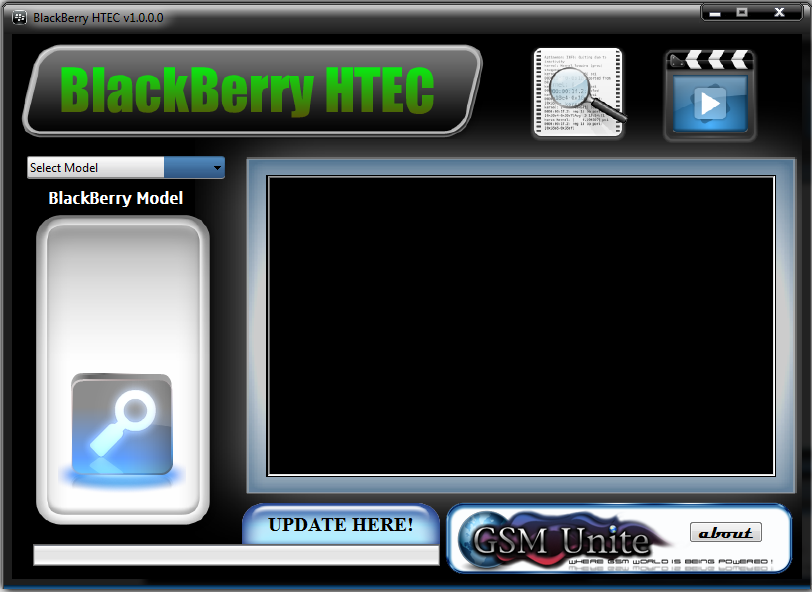
BlackBerry HTEC v.1.0.0.0 ( Tutorial unlock Blackberry all type )

BlackBerry HTEC v.1.0.0.0 ( Tutorial unlock Blackberry all type )

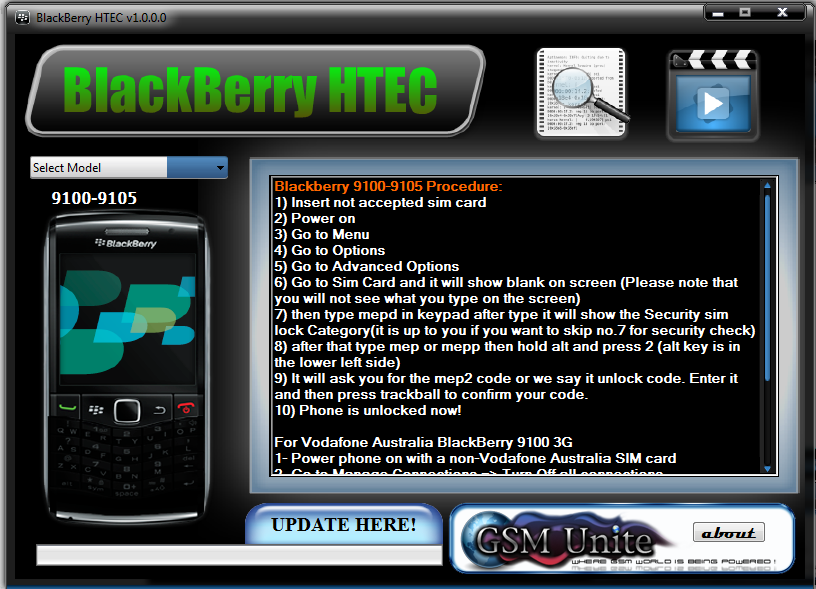
BlackBerry HTEC is one of a kind BlackBerry tutorial that has complete tutorial on how to enter Unlock Code in BlackBerry Phone(HTEC means "HOW TO ENTER CODE").

Screen Shot:


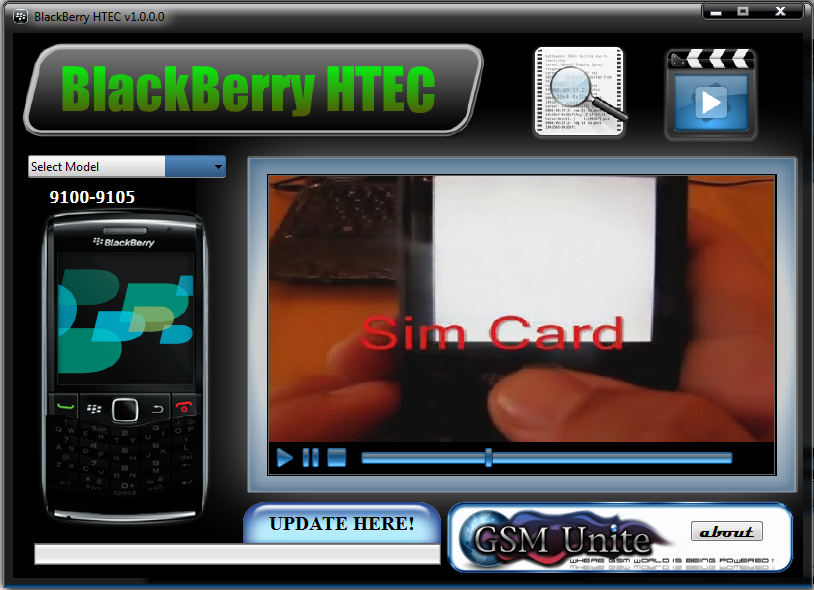
Video Shot:

BlackBerry HTEC.wmv - YouTube


Link Download

Rapidshare


Media Fire

Minggu, 28 Agustus 2011

How to Fix iTunes Error 1013 or 1611 While iOS Restore

Several iPhone 4 users have reported that they are facing iTunes Error 1013 or 1611 while updating their iPhone 4. One Apple Discussions user provided a possible solution for those having these error issues:

For Mac OS X:
Step 1. Go to your “Applications” folder
Step 2. Go to your “Utilities” folder
Step 3. Launch “Terminal”
Step 4. Type “sudo nano /etc/hosts” (without quotes) and hit return
Step 5. Enter your password
Step 6. Use the down arrow key to find the “gs.apple.com” entries. Once the cursor is in front, make sure you comment out the line(s) by entering “#” (no quotes) in front of the text or remove the line that has gs.apple.com entirely
Step 7. Save the file by pressing CONTROL+O on the keyboard
Step 8. Exit the nano editor by pressing CONTROL+X on the keyboard
Step 9. Restore your iDevice

For Windows
Step 1. Start –> Programs –> Accessories
Step 2. Run Notepad or WordPad
Step 3. Click “Open..” from File menu.
Step 4. Browse to Windows/System32/drivers/etc
Step 5. In “files of type:” select all documents
Step 6. Open “hosts”
Step 7. Delete all line that has “gs.apple.com”
Step 8. Hit Save
Step 9. Restore your device

sumber

Guitar Hero - Warriors of Rock 1.0 (BlackBerry)

"With this rhythm-based, three button game that stays true to the original"
Guitar Hero is now available on blackberry! Rock out anytime, anywhere with this rhythm-based, three button game that stays true to the original.

Rock's gauntlet has been thrown down - accept the challenge and transform from Rock Star to Rock Warrior in Guitar Hero™: Warriors of Rock. As Johnny Napalm, your story begins at the legendary CBGB club in New York. Master the first setlist in the all-new Career/Quest Mode and unlock ""Warrior Johnny"" and his special ""Speed Freak+"" ability. Continue your quest by mastering setlists - unlocking new songs, venues and a second playable Warrior along the way - until you're ready to face The Beast in an epic battle to the finish! Or hone your chops in Practice/Training Mode where you can rehearse playing any unlocked song. Dig deep into rock opuses by bands like the Rolling Stones, Aerosmith, AFI, and Slash (featuring Ian Astbury) while completing a chromatic collection of Guitar Hero Achievements. The familiar gameplay of past Guitar Hero games combined with superb game controls designed to melt faces - not fingers - make Warriors of Rock a must-have for mobile gamers. The fate of Rock is in your hands!

Features
* Match the Green, Red, and Yellow notes as they reach the nearest the fret bar. Hit complete groups of star-shaped notes to achieve ""Star Power"" and double your multiplier... score BIG combos by hitting 10 or more correct notes in a row. Keep an eye on the ROCK METER to see how hard you're rocking.
* Unlock ""Warrior"" versions of playable characters that have increased special abilities - like “Speed Freak+” and “Star Power Nova+” - in addition to wildly different appearances and instruments that would make even the biggest rock legends blush.
* Unlock venues in which to thrill new audiences
* A whole host of rock favorites to SHRED including tracks from The Rolling Stones, Sum 41, AFI, Slash (featuring Ian Asbury), and Aerosmith
* Earn over 16 of unique Guitar Hero Achievements such as Anthemic Archivist and Lucifer's Accountant
* Wanna be the best rocker in the world? Check the leaderboard to see just how hard you ROCK."

Requirements: BlackBerry OS


Rabu, 24 Agustus 2011

S.T.A.L.K.E.R.: Shadow Of Chernobyl - S.S.M.O. (2011/MULTI2/RePack)

S.T.A.L.K.E.R.: Shadow Of Chernobyl - S.S.M.O. (2011/MULTI2/RePack)


S.T.A.L.K.E.R.: Shadow Of Chernobyl - S.S.M.O. (2011/MULTI2/RePack)
Year:2011 | PC Game | Eng Rus | Developer: hehe1891 | Publisher: Mod | 2.99 GB
Genre: Action

This is the first foray into Spot Zone, but this time not in order for that would destroy it. Rumours about the incredible artifact Oblivion Lost, which gives the owner of immortality and makes him a legend. This artifact is located near a nuclear power units, and it will get you. Have to re-select into the perimeter zone, and again to overcome all the way through. After all you will find a full fripley.

NEW FEATURES

-A New Beginning game. Now you need to get into the zone, using the items left outside the perimeter. Replaced several plot rolls.
We introduce the real Ukrainian hryvnia. For them just buy things.
Part-integiovan fashion COD hud. Added 3D animation, eating food, putting kits and antiradov. Several new effects post injury, fatigue, accumulated radiation.
Added-release, once in 32 hours, with new monsters and artifacts. During ejection is necessary to find safe shelter, and wait him.
-Implemented beacons with the ability to track objects.
-Added a sleeping bag. Sleep is sometimes accompanied by the horrors of the zone. Sleep for an hour, 3 hours, half day (all Russified and refined). Before going to bed should eat, or you may be able to starvation.
-Added the ability to repair all the inventory at dealers. The more expensive and worn-out thing - more money for repairs.
-Ability to drag some explosive stuff. Created new icons, the ability to trade and use them (Benzin mod).
-Ability to not doing any quest to get to the area of debt-gate can now be opened and closed itself.
New-trader in Pripyat with a wide range of products. Trading ammunition, food, and new artifacts. (By Kanyhalos).
-36 New items randomly eating. New definitions. Spoiled, radioactive and psychotropic food. Cult objects, each of the groups. (Superkontik, condensed milk, Snickers). Some have their own new models. Vodka is replaced by ethanol to the model and description.
-Some kits do not require activation (Wood kit, profiaptechka)
-Restored the nucleus to die quietly and painlessly.
-Changed all caches in all locations. In the recesses of the new and unique things. Created a lot of new caches. Look closely and smash all the boxes.
Commissioned-mod NoSidr v0.9. Removed the initial dialogue with Sidorovich. The door is always open.
-Added a few new quests, for which you get useful information. All secondary quests are rewritten, and rebalanced. They can make good money.
-Ability to upgrade from AKU Sidorovicha found for tools.
-Ability to obtain a rare artifact found for weapons for the Wolf.
Hood costumes on AMC. Ability to disable them in the main menu.
New-rich assortments in baryg. For a long time to write it yourself to see. As you go from the Barman will be new stuff, the more you help, merchants and their groups, the prices will be lower.
-Total number of things now in 2 times more than the original. (C. 350)
-Changing the spawn of all living (8-12 hours)

System requirements

- Processor: 3 Ghz
- RAM: 1024 Mb
- Video: 256 Mb
- HDD: 5 Gb
- The version of DirectX: 9.0

Features Repack 'a

- The game is at version 1.0005

Includes:

- MOD / SSMO (Stalker Shooter Mod of Oblivion)
- Repak without losing quality
- Do not cut / no compression
- All audio / video 100%
- All the registry entries are stored


Download Filesonic:

Code:
http://www.filesonic.com/file/1687693101/S.S.M.O_SeregA Lus.part1.rar
http://www.filesonic.com/file/1687693111/S.S.M.O_SeregA Lus.part2.rar
http://www.filesonic.com/file/1687693121/S.S.M.O_SeregA Lus.part3.rar
http://www.filesonic.com/file/1687693131/S.S.M.O_SeregA Lus.part4.rar
http://www.filesonic.com/file/1687693141/S.S.M.O_SeregA Lus.part5.rar
http://www.filesonic.com/file/1687693151/S.S.M.O_SeregA Lus.part6.rar
http://www.filesonic.com/file/1687693161/S.S.M.O_SeregA Lus.part7.rar
http://www.filesonic.com/file/1687693171/S.S.M.O_SeregA Lus.part8.rar
Download Wupload:
Code:
http://www.wupload.com/file/103629907/S.S.M.O_SeregA Lus.part1.rar
http://www.wupload.com/file/103629909/S.S.M.O_SeregA Lus.part2.rar
http://www.wupload.com/file/103629911/S.S.M.O_SeregA Lus.part3.rar
http://www.wupload.com/file/103629912/S.S.M.O_SeregA Lus.part4.rar
http://www.wupload.com/file/103629913/S.S.M.O_SeregA Lus.part5.rar
http://www.wupload.com/file/103629914/S.S.M.O_SeregA Lus.part6.rar
http://www.wupload.com/file/103629915/S.S.M.O_SeregA Lus.part7.rar
http://www.wupload.com/file/103629916/S.S.M.O_SeregA Lus.part8.rar

Selasa, 23 Agustus 2011

Tutorial (step by step) How to flash LG KP500

1.) BACKUP
Sebelum melakukan flashing ada baiknya di Backup dulu data2 pentingnya [ contact,sms,dll ]menggunakan LG PC SuiteII.

2.)DOWNLOAD GSMULTI AND FIRMWARE
FIRMWARE LG KP500 KP500AT-00-V10n-DEC-17-2008 (v10N) NEW! untuk BI bisa cari di support HWK kode ESA

FLASHER LG - MultiGSM ver 3.0 + kp500 .dll file download DISINI

3.)INSTALL THE SOFTWARE AND DRIVERS - tested XP/w7
(sa'at mengintall hp jangan di hubungkan ke komputer)

3.1.) Install GSMULTI (SETUP_GSMULTI_V30).
- buka GSMULTI
- select: Settings/Configuration
isi DLL dengan file KP500_081002.dll
S/W dengan KP500AT-00-V10n-CIS-XXX-DEC-17-2008
kemudian pilih USB untuk interface nya

3.2.)Install DRIVERS (INFINEON and TI_NEPTUNE)
Driver ada di folder C:\GSMULTI\UsbDrivers

4.) PREPARE AND CONNECT YOUR PHONE
-lepaskan batreery,simcart,memori cart
-Konekan HP ke komputer dengan USB
-tunggu beberapa detik sampai komputer mengenali perangkat baru
5.) USBMap PROGRAM
- jalankan program USBMap_V01 yang ada do folder C:\GSMULTI
- pilih INFINEON dan click MAPPING START
-tunggu sampai terbaca port di USBMap
-klik SAVE&Exit

6.)MAIN PART - FLASHING
-Jalankan GSMMULTI
-cek setting (lihat 3.1 )
- Cek MODEL dan SW VERSION jika sudah benar klik START tunggu sampai selesai

Jumat, 19 Agustus 2011

Blackberry Browser tanpa BIS

Kita udah pada tau klo punya handphone Blackberry, maka kita “terpaksa” harus langganan paket Blackberry Internet Service (BIS) pada operator GSM yg kita pakai.. ada paket harian, mingguan hingga bulanan.. itu juga banyak pilihan “service” yg bisa kita gunakan tergantung paketnya..
tapi gimana ketika paketnya habis masa berlakunya..??
ya kita tau klo blackberry tanpa paket BIS (misalnya paketnya sebulan, trus abis) maka blackberry kita akan masuk masa suspend (yg gak ada urusannya ama masa aktif / tenggang dari kartu GSM kita..) Dan yg bisa kita lakukan di blackberry kita hanya SMS & Telpon saja tanpa chatting / Sosial Networking / Browsing..
Tapi.. klo kita ingin gunakan satu service yg cukup penting, yakni Browsing dalam masa suspend kita.. maka ada cara yg sebenarnya cukup mudah untuk mengaktifkan service ini..


sebelum kita mulai, pastikan kita sudah memiliki hal berikut :
- Handphone Blackberry tentunya.. :mrgreen:
- Laptop / Komputer dengan koneksi internet (buat download dong..)
- Aplikasi “Blackberry Desktop Manager” versi 4 atau 5 atau 6 yg sudah di install di laptop..
- file servicebook (file ipd) khusus yang bisa di download dari sini
OK, peralatan perang sudah ada, saatnya kita lakukan sedikit klik mouse..
[Step 1. ]
Download file servicebook yg berisi file “Browser_via_TCP_all_network_beta_V1.1.ipd” dan letakkan hasil download di Folder yg gampang dicari (taroh aja di Drive C atau D)
[Step 2. ]
colok kabel data antara Blackberry dan Laptop trus buka Blackberry Desktop Manager.
[Step 3. ]
dalam keadaan kabel data masih dicolok, pegang Blackberry lo..(gapapa koq, cuma suruh pegang doang.. :mrgreen: ) trus masuk ke Menu Options > Advanced Options > ServiceBook
[Step 4. ]
setelah itu pencet dan tahan tombol ALT (tau khan yg mana, itu pojok kiri bawah BB lo..) trus pencet juga berurutan tombol S B E B (bahasa lainnya Alt+S B E B)
dan ini akan mengaktifkan mode “Legacy SB restore”

[Step 5. ]
OK, masih inget file “ipd” yg tadi kita download??
Klo udah dapet itu file IPD, ya sekarang tinggal kita restore aja ke BB,
Gw kasi panduan untuk restore via Blackberry Desktop Manager versi 6.0.x di sini..
atau versi lama 4.5.x dan 5.0.x di sini
[Step 6. ]
Klo udah selesai restore Servicebook, coba cek di Menu Options > Advanced Options > ServiceBook, Mustinya isinya gini klo berhasil masuk 2 buah servicebook..

[Step 7. ]
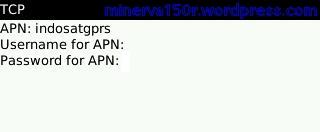
nah sekarang, tergantung operator GSM yg kita gunakan, maka kita harus masukkan APN, username dan juga password yg bisa kita dapatkan dari website operator yg kita pakai (tanya mbah google juga bisa)
masuk ke Menu Options > Advanced Options > TCP
dan silakan isi APN dan username / password jika dibutuhkan..
misalnya begini jika pake Indosat..

[Step 8. ]
OK, settingan udah selesai.. saatnya test buka website..
Buka Browser dulu..


dan Tada… :mrgreen:


harap diinget:
Browser ini menggunakan data normal via GPRS / 3G.. jadi pasti motong pulsa.. jangan harap akan gratis :mrgreen:

Flashing N900 (maemo)


1. install maemo_flasher-3.5_2.5.2.2.exe. Download1 mirror Download2

2. Instal firmware N900 RX-51, yg secara default akan terinstal di c:\Program Files\Common files\Nokia\Data Package\RX-51. Download_Part1 dan Download_Part2
3. Pilih salah satu File bin di folder diatas (contoh=RX-51_2009SE_2.2009.51-1.205.1_PR_LEGACY_205_ARM.bin), dan copy ke 'c:\Program Files\maemo\flasher-3.5\'

4. Jalankan command prompt. Start>Run, kETIK cmd Dan tekan Enter. ketik cd "c:\Program Files\maemo\flasher-3.5" seperti gambar


5. Connect USB cable while pressing 'u' key

Code:
procedure of connecting the N900
1. matikan Maemo
2. Tekan dan tahan ‘u’
3. Pasang USB
4. Saat USB terpasang, Maemo akan dalam kondisi flashing mode
5. Saat USB icon tampil di pojok kanan atas, Maemo dalam flashing mode
6. Lepas key ‘u’

6. Ketik seperti berikut flasher-3.5.exe -F
RX-51_2009SE_2.2009.51-1.205.1_PR_LEGACY_205_ARM.bin -f -R (teks warna ini = adalah firmware yg akan dimasukkan). cara nya seperti poin no. 5

Log proses flashing

Code:
Microsoft Windows XP [Version 5.1.2600]
(C) Copyright 1985-2001 Microsoft Corp.

C:\Documents and Settings\RAMJAN>cd "c:\Program Files\maemo\flasher-3.5"

C:\Program Files\maemo\flasher-3.5>flasher-3.5.exe -F RX-51_2009SE_2.2009.51-1.205.1_PR_LEGACY_205_ARM.bin -f -R
flasher v2.5.2 (Sep 24 2009)

SW version in image: RX-51_2009SE_2.2009.51-1.205.1_PR_LEGACY_205
Image 'kernel', size 1700 kB
        Version 2.6.28-20094102.3+0m5
Image 'rootfs', size 149376 kB
        Version RX-51_2009SE_1.2009.42-11_PR_MR0
Image 'cmt-2nd', size 81408 bytes
        Version 8.2.2009.34.3-2+0m5
Image 'cmt-algo', size 519808 bytes
        Version 8.2.2009.34.3-2+0m5
Image 'cmt-mcusw', size 5786 kB
        Version 8.2.2009.34.3-2+0m5
Image '2nd', size 14720 bytes
        Valid for RX-51: 2217, 2218, 2219, 2220, 2120
        Version 1.4.13+0m5
Image 'xloader', size 14848 bytes
        Valid for RX-51: 2217, 2218, 2219, 2220, 2120
        Version 1.4.13+0m5
Image 'secondary', size 109440 bytes
        Valid for RX-51: 2217, 2218, 2219, 2220, 2120
        Version 1.4.13+0m5
Image '2nd', size 14720 bytes
        Valid for RX-51: 2101, 2102, 2103
        Version 1.4.13+0m5
Image 'xloader', size 14848 bytes
        Valid for RX-51: 2101, 2102, 2103
        Version 1.4.13+0m5
Image 'secondary', size 109440 bytes
        Valid for RX-51: 2101, 2102, 2103
        Version 1.4.13+0m5
Image '2nd', size 14720 bytes
        Valid for RX-51: 2104, 2105, 2106, 2107, 2108, 2109, 2110, 2111, 2112, 2
113, 2114, 2115, 2116, 2117, 2118, 2119
        Version 1.4.13+0m5
Image 'xloader', size 14848 bytes
        Valid for RX-51: 2104, 2105, 2106, 2107, 2108, 2109, 2110, 2111, 2112, 2
113, 2114, 2115, 2116, 2117, 2118, 2119
        Version 1.4.13+0m5
Image 'secondary', size 109440 bytes
        Valid for RX-51: 2104, 2105, 2106, 2107, 2108, 2109, 2110, 2111, 2112, 2
113, 2114, 2115, 2116, 2117, 2118, 2119
        Version 1.4.13+0m5
Image '2nd', size 14720 bytes
        Valid for RX-51: 2201, 2202, 2203, 2204, 2205, 2206, 2207, 2208, 2209, 2
210, 2211, 2212, 2213, 2214, 2215, 2216
        Version 1.4.13+0m5
Image 'xloader', size 14848 bytes
        Valid for RX-51: 2201, 2202, 2203, 2204, 2205, 2206, 2207, 2208, 2209, 2
210, 2211, 2212, 2213, 2214, 2215, 2216
        Version 1.4.13+0m5
Image 'secondary', size 109440 bytes
        Valid for RX-51: 2201, 2202, 2203, 2204, 2205, 2206, 2207, 2208, 2209, 2
210, 2211, 2212, 2213, 2214, 2215, 2216
        Version 1.4.13+0m5
Suitable USB device not found, waiting.
USB device found found at bus bus-0, device address \\.\libusb0-0001--0x0421-0x0
105.
Found device RX-51, hardware revision 2101
NOLO version 1.4.13
Version of 'sw-release': RX-51_2009SE_1.2009.42-11.003_PR_003
Sending xloader image (14 kB)...
100% (14 of 0 kB, avg. 14 kB/s)
Sending secondary image (106 kB)...
100% (106 of 0 kB, avg. 106 kB/s)
Flashing bootloader... done.
Sending cmt-2nd image (79 kB)...
100% (79 of 0 kB, avg. 79 kB/s)
Sending cmt-algo image (507 kB)...
100% (507 of 0 kB, avg. 507 kB/s)
Sending cmt-mcusw image (5786 kB)...
100% (5786 of 0 kB, avg. 5786 kB/s)
Flashing cmt-mcusw... done.
Sending kernel image (1700 kB)...
100% (1700 of 0 kB, avg. 1700 kB/s)
Flashing kernel... done.
Sending and flashing rootfs image (149376 kB)...
100% (149376 of 0 kB, avg. 149376 kB/s)
Finishing flashing... done
CMT flashed successfully

http://gsmindonesia.com/attachment.php?attachmentid=206&d=1267345706


Video

Code:
http://img19.imageshack.u

s/img19/7903/n900vdo.swf

Rabu, 17 Agustus 2011

Backup dan Install Windows Secepat Kilat dengan Hiren's Boot CD

Proses instalasi sistem operasi seringkali menjadi hal yang sangat menjemukan.hiren-norton-ghost Terutama apabila Anda termasuk orang yang risih jika instalasi OS Anda tidak stabil atau lemot. Saya dulu pernah termasuk dalam ‘golongan’ ini, dalam seminggu saya bisa install windows 2 hingga 3 kali karena beberapa instalasi game 3D yang saya mainkan sudah tamat dan harus diganti dengan yang baru :P

Selain karena memang ‘hobi’, terkadang Windows mengalami masalah yang tak terduga seperti serangan virus, missing file atau instalasi error. Ini bisa membuat makin sering kita ‘bermain’ dengan CD instalasi Windows. Repotnya, jika kita ga bisa berlama-lama buang-buang waktu hanya untuk install Windows plus aplikasi seabreg. Belum lagi aktivasinya.. ribet kan! Nah, daripada kita alami hal ini saya akan paparkan langkah antisipasi yang bisa Anda praktekkan. Bagi yang sudah tahu, maap kalo ada siaran ulang ya..

Untuk melakukan praktek, kita perlu program Cloning Tool. Sebenarnya banyak sekali program semacam ini yang beredar di pasaran, diantaranya Symantec/Powerquest Disk Image, Roxio GoBack, Windows System Restore, dll. Nah, kali ini kita akan ‘bermain’ dengan Program Norton Ghost 11.5 yang dapat Anda temukan dalam CD Hiren’s Boot CD 9.8. Bagi yang belum punya Hiren’s Boot CD Versi terbaru, silakan dapatkan di sini.

Norton Ghost menyediakan fungsi backup dan restore dengan mudah. Dengan bantuan Hiren’s Boot CD, Anda bisa melakukan prose backup dan restore instalasi Sistem Operasi Anda dengan mudah, praktis dan cepat. Ya, nggak secepat kilat dalam arti sebenarnya sih.. Tapi jauh lebih cepat daripada jika Anda harus menginstall Windows dari awal berikut program yang akan Anda gunakan.

Sebelumnya, persiapkan perlengkapan yang dibutuhkan sebagai berikut:

- Komputer atau Notebook target yang dilengkapi drive CD/DVD untuk menjalankan Hiren’s Boot CD. Saya sarankan minimal terdapat 2 partisi, sistem C:/ atau drive yang berisi instalasi Windows dan partisi lain untuk menyimpan image
- CD Hiren’s Boot CD 9.8 berisi Norton Ghost 11.5 atau Hiren’s Boot USB Flashdisk
- Flashdisk/keping DVD untuk menyimpan backup file image (Optional)

Prinsip kerja
Pada dasarnya, ada dua langkah yang Anda lakukan

  • Membuat backup Data Partisi PC yang berisi Sistem Operasi Windows ke dalam File Image . File ini berisi rekaman komplit file sistem operasi Anda berikut program yang telah ter-install didalamnya. File ini harus disimpan di partisi selain partisi Windows itu sendiri. Misalnya Anda punya C:/ yang bersi instalasi Windows, Anda harus menyimpan file image di partisi selain C:/. Itulah mengapa di atas saya menyarankan minimal ada 2 partisi.
  • Perlu saya tekankan bahwa, langkah ini mutlak diperlukan jika Anda ingin bisa melakukan langkah restorasi/pemulihan sistem dengan cepat. Dengan kata lain, tanpa adanya file Image Anda tidak bisa melakukan restorasi Windows.
  • Restorasi Windows. Jika terjadi sesuatu, anda bisa memanggil file backup yang telah Anda buat sebelumnya untuk memulihkan instalasi Windows persis seperti saat file image dibuat.

Langkah Pertama, Membuat File Image.

1. Masukkan Hiren’s Boot Flashdisk USB atau Hiren’s Boot CD sesuai dengan preferensi Anda.

2. Nyalakan komputer, masuk ke BIOS dengan menekan DEL/F2/F8/F12 sesuai dengan BIOS PC Anda.

3. Masuk ke Bagian Boot Sequence/Urutan Booting. Pastikan media yang Anda gunakan menempati urutan pertama booting. Misalnya: Anda memilih menggunakan CD Hiren’s, pastikan CDROM berada pada posisi booting pertama.

4. Pada menu Booting Hiren’s, pilih ‘Start Boot CD’

5. Pada Menu Utama Hiren’s, Pilih [2.] Backup Tool > [2.] Norton Ghost 11.5 > [8.]Ghost (Normal). Tunggu beberapa saat hingga program Norton Ghost berjalan. Klik [OK]


6. Pilih Menu > Local > Partition > To Image untuk menyimpan partisi ke dalam sebuah file image.

Spoiler for gambar1:


7. Pilih Harddisk Fisik yang akan di backup. Biasanya Windows ada pada Local (1) seperti pada contoh, [OK].
Spoiler for gambar1:


8. Pilih Partisi Harddisk yang akan di backup. Biasanya Windows ada pada Primary Drive seperti pada contoh, [OK]. Perhatikan atribut lainnya seperti File System (NTFS/FAT32), Label, Ukuran dsb. Pastikan Anda memilih drive yang tepat.
Spoiler for gambar1:


9. Tentukan Partisi Harddisk mana yang akan digunakan untuk menyimpan file backup image. Beri nama pada file, misalnya Backup_1 kemudian klik [SAVE]. Perhatikan bahwa harddisk ditulis dalam urutan seperti berikut; D:1.2:[DATA] FAT, artinya adalah:
D: = Drive D:
1.2: = merupakan Harddisk Fisik Pertama Partisi Kedua
[DATA] = label DATA
FAT = File System FAT32
Spoiler for gambar1:


10. Selanjutnya akan muncul dialog kompresi Image File, pilih salah satu berdasarkan keterangan berikut:

No = Pilih ini jika Anda tidak ingin mengubah file image dari ukuran file windows sebenarnya
FAST = Pilihan kompresi cepat, hasilnya kurang lebih 30% dari ukuran file sebenarnya
HIGH = Pilihan kompresi tingi, hasilnya bisa sampai 60% dari ukuran file asli meski prosesnya akan sedikit lebih lambat.

Saya anjurkan Anda memilih pilihan ini untuk menghemat space harddisk. Toh Norton Ghost tidak mengubah isi file image, hanya ukuran filenya saja yang dipadatkan. Persis seperti yang dilakukan oleh WinZIP ato WinRAR.
Spoiler for gambar1:


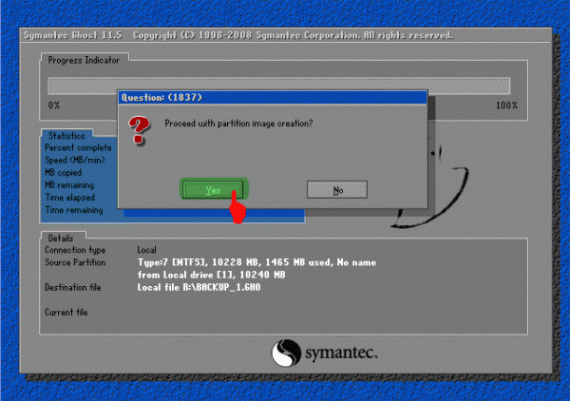
11. Ketika muncul dialog box ‘Procesed with partition image creation?’ Pilih [YES]
Spoiler for gambar1:


12. Tunggu beberapa saat hingga proses selesai dan muncul Image Box ‘Image Creation Completed Successfully’, klik [Continue]. Klik [Quit] untuk keluar Program.

Sampai di sini Anda sudah punya satu file image dari sistem operasi Anda yang sewaktu-waktu bisa dipanggil kembali untuk melakukan restorasi. Anda bisa menggunakan Flashdisk atau Media DVD untuk menyimpan file Image ini, hanya untuk berjaga-jaga.

Nah, suatu saat jika ada masalah dengan Windows, Anda tinggal melakukan langkah restorasi berikut ini.

Langkah Kedua, Restore Windows dari Backup File Image

1. Boot dari Hiren’s Boot CD atau Hiren’s Boot USB Flashdisk

2. Pada menu Booting Hiren’s, pilih ‘Start Boot CD’

3. Pada Menu Utama Hiren’s, Pilih [2.] Backup Tool > [2.] Norton Ghost 11.5 > [8.]Ghost (Normal). Tunggu beberapa saat hingga program Norton Ghost berjalan. Klik [OK].

4. Pilih Menu > Local > Partition > From Image untuk me-restore partisi dari file image yang tadi telah kita buat.
Spoiler for gambar1:


5. Temukan file Image dengan ekstensi .GHO pada drive penyimpanan Anda. Pilih, dan akhiri dengan Open.
Spoiler for gambar1:


6. Pilih Partisi sumber/Source file image kemudian klik [OK]
Spoiler for gambar1:


7. Pilih Harddisk fisik tujuan/Destination Restorasi Windows, [OK]
Spoiler for gambar1:


8. Pilih Partisi Harddisk tujuan/Destination Restorasi. Pilih Primary [OK]
Spoiler for gambar1:


9. Ketika Muncul Dialog Box ‘Prosses With Partition Restore?’ klik [Yes]

10. Tunggu hingga selesai 100%

11. Klik [Reset Computer] untuk me-restart Komputer.

Selamat Berjuang…….
Download Hiren Boot CD v.9.6
SUMBER http://guntingbatukertas.com/